CartPt that represents a location using x, y coordinates, where x and y are
whole (non-negative) numbers.
SimpleNode that represents a node in a graph. Each node has a name (one or more characters, usually letters and digits) and a
location (a Cartesian point).
Edge that represents an edge in a graph. Each edge is defined by the names of its source and
target nodes.
ILoString, MtLoString, and
ConsLoString.)
Node that includes not only the information required for the class SimpleNode,
but also includes a list of the names of all neighbors of this node.
Graph.
Examples class an example of a graph that
represents the graph pictured in Homework 1.
                     +---------------+
                     | InterestPoint |
                     +---------------+
                     +---------------+
                             |
                            / \
                            ---
                             |
         ----------------------------------------
         |                   |                  |
  +--------------+    +-------------+    +--------------+
  | Hotel        |    | Museum      |    | Hospital     |
  +--------------+    +-------------+    +--------------+
  | String name  |    | String name |    | String name  |
+-| CartPt loc   |  +-| CartPt loc  |  +-| CartPt loc   |
| | String phone |  | | String kind |  | | boolean er   |
| +--------------+  | | String url  |  | +--------------+
|                   | +-------------+  |
|    +--------------+                  |
+--+ | +-------------------------------+
   | | |
   v v v
+-------+
| CartPt|
+-------+
| int x |
| int y |
+-------+
Translate the class diagram into a class definition.
Create an instance of the class that represents the locations
on the following map. The grid lines are 20 pixels apart.
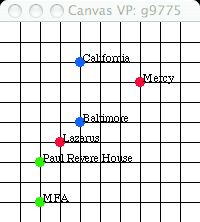
Hotel California
Hotel Baltimore
Museum of Fine Arts
Paul Revere House
Mercy Hospital
Lazarus Hospital
What to Turn In
Using web-based turnin, turn in a single file hw2.bjava containing all code and documentation for this assignment. Both partners' names and wpi login names should appear in a comment at the top of the file.